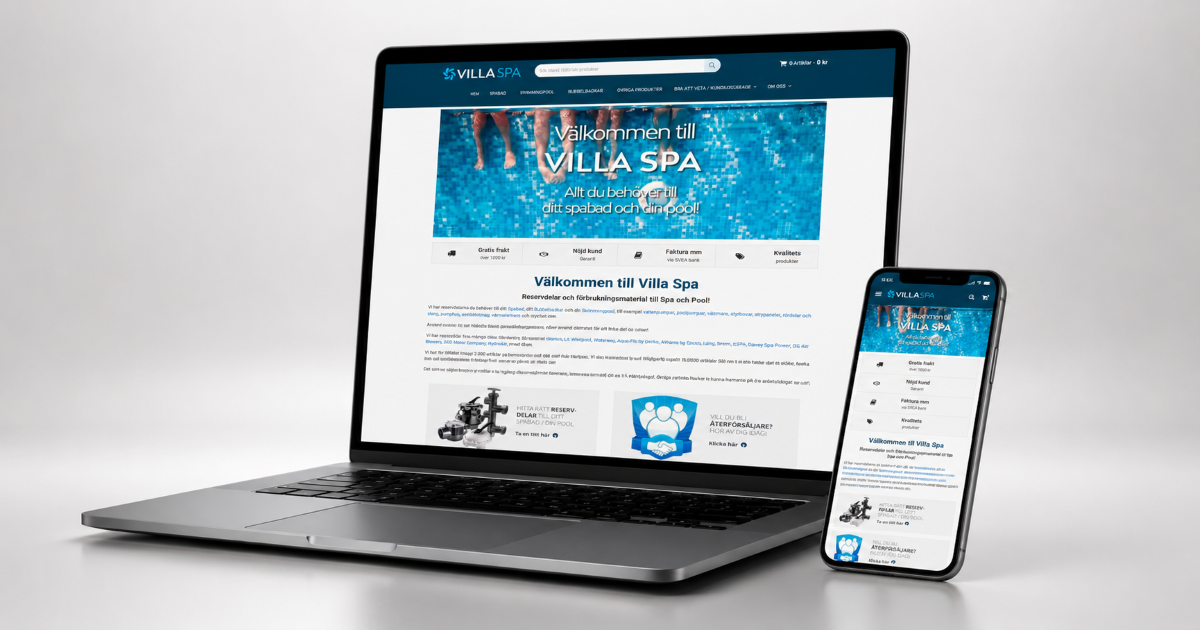
In 2026, U.S. e-commerce sales reached 16.9% of total retail spending (U.S. Census Bureau, 2026). Most of that spending flows through catalog pages that Baymard Institute rates as barely functional. In fact, in 2025 the research group found that 58% of desktop sites and 78% of mobile sites deliver "poor to mediocre" Product List UX. That finding comes from more than 21,000 manually reviewed UX parameters across 170+ leading stores (Baymard Institute, 2025). In 2019, I ran an Oxygen Builder WooCommerce migration for villaspa.se to close that gap. Villa Spa Sweden sells spare parts for hot tubs, pools, and heating systems. In short, the brief was simple. Move the site to Oxygen Builder Classic. Keep its search rankings intact. Give the parts catalog a layout customers could use to find the right pump or heater.
Two terms matter here. WooCommerce is the open-source plugin that turns a WordPress site into an online store, handling products, categories, and checkout. Oxygen Builder Classic is a visual page builder. It outputs markup closer to hand-coded WordPress than most drag-and-drop tools do. That gives a developer more direct control over what ships on each template.
Key Takeaways
- In 2025, Baymard Institute found 58% of desktop and 78% of mobile ecommerce sites have mediocre-or-worse Product List UX across 170+ benchmarked stores (Baymard Institute).
- Portent's 2025 site-speed research shows ecommerce conversion rate falling from 3.05% at a 1-second load time to 0.67% at 4 seconds, based on 100+ million page views (Portent).
- In 2026, Baymard Institute found that 12% of top ecommerce sites still fail exact-match search for a product name or model number visible on the product page itself.
- I completed the Oxygen Builder WooCommerce migration in 1-2 months: moving to Oxygen Builder Classic, building a custom WooCommerce category and product layout, and keeping every existing URL in place.
Most WooCommerce stores ship with a generic archive template. For example, it repeats a grid of thumbnails, a title, a price, and an "Add to Cart" button identically, whether the category holds five products or five hundred. In 2025, Baymard's Product List UX benchmark reviewed 21,000+ UX parameters across 170+ leading stores. It found that 58% of desktop and 78% of mobile sites deliver a "poor to mediocre" experience at exactly this layer (Baymard Institute). For a catalog selling technical replacement parts, a generic grid does more than look unpolished. In particular, it hides the compatibility information a shopper needs before they'll buy.
That was the starting condition I found at villaspa.se in 2019. A basic WordPress layout presented pumps, heaters, control systems, filters, and chemicals from multiple manufacturers (Balboa, Waterway, Gecko, and others) the same generic way regardless of category. As a result, a shopper looking for a replacement pump had no faster path than scrolling and guessing. Consequently, I rebuilt the category structure around that specific problem instead of dropping in a new theme.
For context on why a plain theme swap wouldn't have solved this: read about the SurePlunge Oxygen Builder migration, a related WordPress rebuild I completed the following year that focused on the SEO-preservation side of this same builder.
Google states this plainly in its own migration guidance: change one thing at a time. Its documentation recommends moving to a new setup first, then adjusting layout separately, so that any ranking movement traces back to a single cause instead of several stacked at once (Google Search Central, ongoing). Similarly, that principle governed the villaspa.se rebuild the same way it governed the SurePlunge migration, the SEO-preservation-focused sibling project I wrote up separately.
I carried every existing URL on villaspa.se over unchanged during the move to Oxygen Builder Classic. In fact, the builder swap and the visual rebuild both happened entirely inside the existing address structure. As a result, the site's search visibility going into the project came out the other side without a redirect map to manage and without a ranking drop to explain.
In my experience, the harder discipline isn't leaving URLs alone. In fact, it's resisting the urge to "clean up" category structure while you're already inside the builder rebuilding everything else. Reorganizing categories at the same time as the visual rebuild would have created new paths for the same products. In other words, that's exactly the stacked-variable problem Google's guidance warns against.
In 2026, Baymard Institute's research on ecommerce search query types found that 12% of top benchmarked stores still fail basic exact-match search. In practice, that means a shopper typing a product name or model number visible right there on the product page gets no result (Baymard Institute). In particular, that failure mode matters more for a parts catalog than for most product categories. Parts shoppers rarely browse casually. They usually know the model number of the pump or heater they're replacing. Thus a search box that can't match it sends them straight to a competitor.
Speed and findability compound each other on a catalog this size. Oxygen Builder Classic's closer-to-native markup helped on the speed side, the same way it did on the SurePlunge project: fewer unused framework styles and scripts loading on every template. That matters directly for conversion. Portent's data above found a steep drop: from a 3.05% conversion rate at a 1-second load time down to 0.67% at 4 seconds. Notably, that figure draws on more than 100 million page views across 20 sites (Portent, 2025). Meanwhile, on the findability side, I made sure the custom category and product templates surfaced brand, compatibility, and part-type filters directly. That way, a generic search box didn't have to do all the work alone.
Considering a similar WooCommerce rebuild for your own catalog? The Web Development services page has more on how these projects are scoped.
The common assumption is that a "custom" ecommerce layout is mostly a branding exercise: new colors, a new font, a redesigned header. For a technical parts catalog, I'd argue the more valuable customization is structural. For instance, category pages organized around how a shopper narrows down "which pump fits my hot tub" beat a one-size-fits-all product grid every time. In other words, that's a UX decision more than a visual one. It explains why a generic WooCommerce theme underperforms specifically on catalogs like villaspa.se's rather than on ecommerce broadly.
Here's the honest split for the villaspa.se rebuild. What changed: the builder itself (moving off a basic WordPress setup into Oxygen Builder Classic), the visual layer, and the category and product template structure built around the parts catalog. What stayed the same: every existing URL and the site's existing search visibility going into the project. HubSpot's guidance on WordPress performance notes that "plugins are a double-edged sword," with heavy themes and unnecessary scripts a common cause of slow templates (HubSpot, updated January 2025). However, a builder swap only gives you the chance to remove that kind of bloat if you actually audit what each template loads. Otherwise, it's easy to assume the new builder handles it automatically when it doesn't.

Separate two decisions that get treated as one project: what the category pages should look like, and what the URL structure should be. Answer the layout question by studying how your specific catalog gets searched, whether that's by model number, brand, or compatibility. Don't just copy a generic ecommerce template. Leave the URL question alone unless there's an active problem with it. Google's migration guidance treats URL stability as close to non-negotiable during a redesign (Google Search Central, ongoing). That said, a stable URL structure gives search engines nothing new to re-evaluate at the address level. The presentation layer can change underneath it, and the addresses still hold.
For a catalog the size of villaspa.se's, that discipline turned a 1-2 month rebuild into a routine one. In short, there was no redirect map to maintain, no ranking recovery period, and a category layout built for the way parts shoppers actually search rather than the way a default theme assumes they will.
Keep the URL structure untouched and only change the presentation layer. Google's own site-move guidance says to change one thing at a time, since stacking a builder switch with a URL restructure makes it nearly impossible to tell which change caused a ranking drop.
Mostly poor product findability. Baymard Institute's benchmark found 58% of desktop and 78% of mobile ecommerce sites have mediocre-or-worse Product List UX, meaning shoppers can see a category exists but struggle to filter, sort, or compare within it.
Because parts shoppers usually search by exact model or SKU, not a general product name. Baymard Institute found 12% of top ecommerce sites still fail basic exact-match searches for a product name or model number that's on the product page itself.
A generic theme applies the same grid to every category regardless of catalog depth. A custom layout can be built around how a specific catalog is actually searched, filtered by brand or compatibility, and compared, which matters more for technical parts catalogs than for simple product lines.
For a small-to-midsize catalog site with an existing product database, 1 to 2 months is a realistic range: builder migration and template rebuilding, custom category and product layouts, then QA against the live catalog before launch.
The villaspa.se rebuild didn't succeed because the site "looked nicer." It succeeded because I rebuilt the category and product templates around how a spare-parts shopper actually searches: by brand, model, and compatibility. Specifically, I treated the URL structure and existing SEO as fixed constraints from day one, not something to patch later. Baymard's research suggests most WooCommerce catalogs never make that first decision deliberately. In fact, they simply inherit whatever grid their theme shipped with, and it shows in the 58% and 78% mediocre-or-worse numbers cited above.
See the full portfolio for more projects like this one.
Written by Ibrahim Jaber, Web Developer. Ibrahim builds and rebuilds WordPress and WooCommerce sites for small businesses, with a focus on catalog UX and migrations that don't put existing search visibility at risk. More projects at ibrahim-jaber.com.
Skills demonstrated: This project combined WordPress migration discipline with ecommerce catalog design, rebuilding villaspa.se's WooCommerce category and product templates inside Oxygen Builder Classic while treating the existing URL structure as untouchable. It called for the same technical-SEO awareness as a pure migration project. On top of that, it needed enough hands-on WooCommerce and UX judgment to design category pages around how a spare-parts catalog is actually searched: filtered by brand, model, and compatibility rather than a generic product grid.
Sources
