Key Takeaways
- Manual data entry costs U.S. companies an average of $28,500 per employee per year (Parseur / QuestionPro survey, 2025)
- A single batch BOM export previously required 3–66+ hours of manual navigation. It now runs unattended.
- The primary engineering challenges were not the automation logic itself, but virtualized DOM rendering and browser download throttling.
- A Chromium MV3 extension using vanilla JavaScript, tested in Microsoft Edge, addressed all three workflow bottlenecks: BOM export, pricing updates, and sizing edits.
- Feature-level benchmarking showed up to a 5x reduction in click count on the highest-friction workflows, with no data ever leaving the internal network.
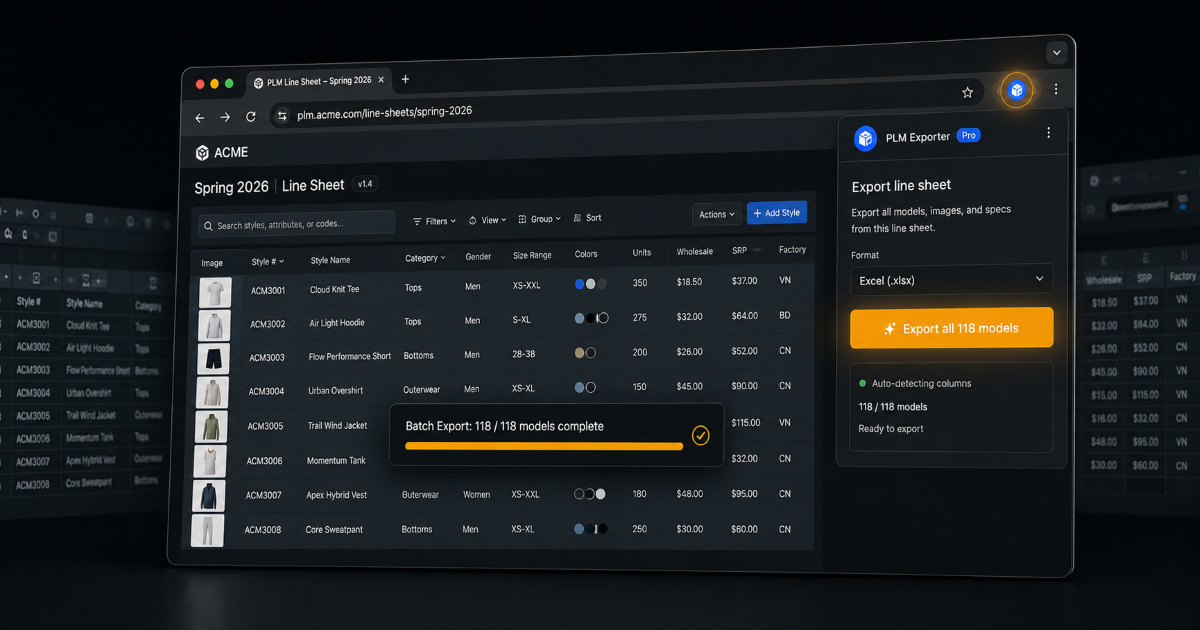
This case study documents the design and delivery of a Chromium Manifest V3 browser extension, built and tested in Microsoft Edge, to automate a manual product data workflow for a large apparel retailer's enterprise PLM (Product Lifecycle Management) system. Because the extension targets the Chromium extension platform rather than a single browser's proprietary APIs, it is compatible with any Chromium-based browser, including Chrome and Edge.
The engagement addressed three recurring operational bottlenecks: bill-of-materials (BOM) export, pricing table updates, and sizing/variant matrix edits. The most significant of these, BOM export, previously required a product manager to navigate hundreds of product models one tab at a time. The resulting extension converted that process into a single unattended batch operation.
Manual data entry costs U.S. companies an average of $28,500 per employee per year, with workers spending more than nine hours per week transferring data between systems (Parseur / QuestionPro, 2025). The workflow addressed in this project was a direct example of that cost.
The organization manages hundreds of product models through an enterprise PLM system. Three workflows were identified as the primary sources of lost time each season:
BOM Export (Bill of Materials)
Extracting BOM data required a product manager to navigate to a line sheet, open each model individually (one tab at a time), navigate to its BOM page, trigger an Excel export, wait for the download, close the tab, and repeat for every model in the range. With 100–800+ models per line sheet at 2–5 minutes per model, this amounted to 3–66+ hours of manual navigation per export cycle.
Pricing Updates
Updating price rows across a pricing table required manual, field-by-field editing with no bulk mechanism.
Sizing and Variant Matrix
Mass sizing edits and variant matrix updates required navigating multiple UI layers, with no keyboard shortcuts or batch capability.
This cycle repeated every product season across dozens of team members.

McKinsey found that 60% of employees could save 30% of their working time by automating routine tasks (McKinsey, "Unlocking the potential of generative AI in knowledge work", 2023). Realizing that potential required solving the specific technical constraints of the target system rather than applying a generic automation script.
Google deprecated Manifest V2 extensions in 2024, making MV3 the only supported path for new extensions across the Chromium ecosystem, including Chrome and Microsoft Edge (Google Chrome Developers, "Welcome to Manifest V3", 2024). The target portal's line sheet used AG Grid's row virtualization, which renders only visible rows to maintain performance at scale (AG Grid, "Row Virtualisation", 2024). Chromium's throttling of repeated same-origin downloads is a known browser behavior that extension developers must explicitly account for (Chromium Issue Tracker, 2023).
Three technical constraints made this extension non-trivial to build.
1. Nested iframe with AJAX navigation
The portal renders inside a nested iframe and uses AJAX navigation, so standard DOM event listeners do not reliably detect page changes. This was resolved with polling-based page-state detection to track URL and content changes.
2. Virtualized line sheet grid
At any given moment, only around 20 rows exist in the DOM, even when the underlying line sheet contains 800+ models. A row that has not been rendered cannot be read.
This was solved with a two-pass scroll-harvest algorithm: the viewport is scrolled in defined steps, row identifiers are captured at each position, and results are deduplicated by stable row index. This approach made reliable batch operation possible across the full model range.
3. Browser download throttling
Chromium intervenes when downloads are triggered in rapid succession from the same origin. A download-event confirmation flow with retry logic and user guidance for browser settings was built to address this. Without it, the batch would silently skip downloads mid-run.
The extension reached v1.8.7, shipping six features across the three original workflow bottlenecks. It was built on the Chromium extension platform and specifically tested in Microsoft Edge:
| Feature | Trigger | Description |
|---|---|---|
| Batch BOM Export | Button | Harvests the full virtual line sheet, opens each model in a background tab, exports BOM, confirms download, closes tab, proceeds |
| Single-model BOM Export | Title-bar button | One-click export for the currently open model |
| Tech Pack Generation | Button | One-click PDF spec generation |
| Price Row Sync | Button | Bulk pricing table update |
| Sizing Mass Edit | Keyboard shortcut | Mass size editing across the product range |
| Variant Matrix Update + Validate | Keyboard shortcut | Batch variant update with validation pass |
Stack: JavaScript (Vanilla), Chromium Extension APIs (Manifest V3), Microsoft Edge DevTools for diagnostic-first development.

A later internal review quantified each shipped feature individually, measuring the workflow before and after automation:
| Feature | Before | After | Measured Gain |
|---|---|---|---|
| Price Sync Across Order Dates | Manual, model-by-model pricing updates | Single automated sync across order date ranges | 2–5 minutes saved per model; savings scale with model count |
| Go to Sizing | 5 clicks through intermediate screens | 1-click direct navigation | ~30 seconds saved per navigation, repeated across every model |
| Variant Matrix Update & Validation | 5–8 manual clicks, 2–3 minutes per model | Single-click update with full validation | 2–3 minutes reduced to roughly 10 seconds per model |
| All BOM Download | ~30 minutes manually for a 10-model supplier | Bulk download for an entire supplier in a single action | Reduced to 5–6 minutes, a roughly 5x reduction |
Across the four features benchmarked, click count and task time dropped by as much as 5x on the highest-friction workflows. The development approach was consistent across all four: identify the highest-click or highest-wait step in a workflow, then reduce it to a single action.
The extension operates entirely within the internal network environment. No data is transmitted to external services or third parties. This was a hard constraint given the sensitivity of pricing and supplier data inside an enterprise PLM system.
The before/after comparison for BOM export:
Beyond raw time savings, the extension improved process reliability:
That fix carries a broader finding: the underlying bug had produced no error or warning, only incomplete exports. Beyond time savings, the automation surfaced a data quality issue that manual review had not caught.
Teams affected: Product management and sourcing teams responsible for seasonal product lines.
Yes, with caveats. Extensions built on the Chromium extension platform (Chrome, Microsoft Edge, and other Chromium-based browsers) can control any web-based system the user has access to, including enterprise portals. The constraints are: the portal must be web-based (not a desktop application), the extension must handle dynamic rendering (AJAX, iframes, virtualized grids), and download throttling must be managed. This extension, tested in Microsoft Edge, addressed all three.
Manifest V2 was deprecated by Google and is no longer supported across Chromium-based browsers, including Chrome and Microsoft Edge. MV3 uses service workers instead of persistent background pages, which required restructuring the batch state machine. It is the only viable choice for any extension built in 2024 or later.
The two-pass scroll-harvest approach: scroll the viewport in incremental steps, capture row identifiers (stable row index or unique key) at each scroll position, and deduplicate across passes. The result is a complete list of identifiers without relying on any rows being present in the DOM simultaneously.
Selector brittleness is a known risk with any DOM-based automation. The extension uses the most stable selectors available (data attributes and structural patterns rather than class names) and was designed for iterative maintenance. Version history from v1.5 to v1.8.7 reflects that maintenance cycle.
Yes. The core patterns (polling-based state detection, scroll-harvest for virtual lists, download confirmation flow) apply to any enterprise web application with similar constraints. The implementation is portal-specific, but the underlying techniques transfer.
No. The extension operates entirely within the internal network environment, and no data is transmitted to external services or third parties. This was a hard requirement given the sensitivity of pricing and supplier data inside the PLM system.
This project required working within the constraints of a third-party enterprise UI, building state machines resilient to asynchronous timing issues, and adopting a diagnostic-first rather than feature-first development approach. The scroll-harvest algorithm in particular had no existing reference implementation and required a first-principles solution.
Technical: Chromium Extension (MV3), Virtual DOM navigation, Async automation, Multi-phase retry engineering, AG Grid virtualization handling, Diagnostic-first development methodology
Written by Mohammad Ibrahim Jaber. This case study is anonymized: no employer name, portal URL, or proprietary system identifiers are included.
